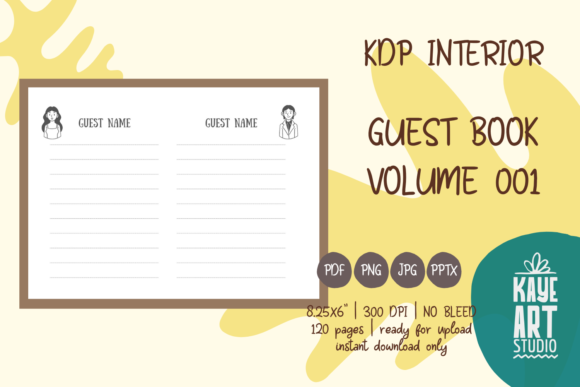
KDP Interior Guest Book Vol. 01: A Practical Guide to Avoiding Common Publishing Pitfalls
Creating a successful low-content book on Amazon requires more than just uploading a file; it demands precision, foresight, and an understanding of platform specifications. The KDP Interior Guest Book Vol. 01 is designed specifically to streamline this process for publishers who want a professional foundation without the technical headaches. This interior template offers a pre-formatted solution for guest books, sign-in logs, and visitor registers, but its value depends entirely on how correctly you implement it. Many creators overlook critical details during the selection and upload phases, leading to rejected manuscripts, poor print quality, or customer dissatisfaction. Understanding the specific attributes of this volume is the first step toward publishing a high-quality product that stands out in a crowded marketplace.
Understanding the Specifics of Volume 01
Before integrating KDP Interior Guest Book Vol. 01 into your publishing workflow, you must understand exactly what you are acquiring. This listing provides the interior content only. A frequent point of confusion for new publishers is the assumption that a complete book file is included. You are responsible for designing and uploading a separate cover that matches the interior’s specifications. Failing to create a custom cover will halt your publishing progress immediately.
The trim size for this volume is strictly 8.25 x 6 inches. This is a landscape orientation, which differs from the standard portrait layouts many beginners default to. Landscape guest books are often preferred for events, museums, and vacation rentals because they provide ample horizontal space for signatures and messages. However, this non-standard size requires careful attention when setting up your KDP project. If you select a different trim size in the KDP dashboard, the interior file will not align correctly, resulting in margins being cut off or content shifting into the gutter.
Critical Mistakes with Bleed and Margin Settings
One of the most common technical errors occurs when configuring bleed settings. KDP Interior Guest Book Vol. 01 is formatted with NO BLEED. This means all content, including lines, frames, and text, stays within the safe margin area and does not extend to the edge of the page. Publishers often mistakenly select "Bleed" in the KDP upload options because they assume all professional books require it. Selecting bleed for a no-bleed file forces the system to zoom in or shift the content, which ruins the layout and creates uneven white borders.
Always verify your manuscript settings before uploading. When prompted by KDP, explicitly choose "No Bleed." This ensures the 8.25 x 6 inch canvas remains intact. Additionally, respect the safe zone. Even though the file is pre-tested, adding your own branding or logos to the interior pages later can push elements too close to the trim line. Maintain a minimum safety margin of 0.375 inches on the outside edges and 0.5 inches on the gutter side to account for binding variance. Ignoring these spatial constraints is the primary reason for printing defects in landscape formats.
File Format and Resolution Integrity
Quality control is non-negotiable in print publishing. This interior package includes files in PNG, PDF, JPG, and PPTX formats at 300 DPI. While having multiple options is convenient, choosing the wrong format can degrade your final product. Some users opt for JPG files because they are familiar with image editing, but JPGs use lossy compression. Uploading a compressed JPG as a book interior can result in pixelated lines, artifacting around text, and muddy grayscale gradients.
Best Practice: Always prioritize the PDF file for your final upload. PDF preserves vector sharpness and exact positioning, ensuring the 300 DPI resolution translates perfectly to print. Use the PPTX file only if you need to customize the layout or add specific prompts, and always export that edited file as a high-quality PDF before uploading. Never upscale a lower-resolution image to meet the 300 DPI requirement; digital interpolation cannot create detail that doesn't exist. The provided files have been tested on KDP, so using them in their native PDF state is the safest route to approval.
The Page Count Misconception
KDP Interior Guest Book Vol. 01 contains exactly 120 pages. This page count dictates your cover spine width calculation. A significant mistake arises when publishers modify the interior—adding or removing pages—and then fail to update their cover dimensions accordingly. Even a two-page difference changes the spine width measurement. If your cover spine does not match the final interior page count, the cover art will wrap incorrectly around the physical book.
Furthermore, consider the usability of 120 pages for your specific niche. For a wedding guest book, 120 pages might be excessive, leading to wasted paper and higher printing costs that eat into royalties. For a busy museum or national park log, it might be insufficient. Evaluate your target audience's needs before committing. If you decide to alter the page count using the editable PPTX source, remember to regenerate your cover template using KDP’s calculator based on the new page total, not the original 120.
Evaluating Usability Before Purchase
Not every guest book interior suits every purpose. Before downloading KDP Interior Guest Book Vol. 01, review the preview images critically. Does the line spacing accommodate handwriting? Are the fields relevant to your intended use case? A generic "Name and Comment" layout may not work for a B&B that needs "Check-out Date" and "Room Number." Buying a template that requires extensive redesign defeats the purpose of saving time.
Consider the end-user experience. Landscape 8.25 x 6 inch books lay flat differently than portrait books. Ensure the binding gutter has enough whitespace so guests don't have to struggle to write near the spine. This volume accounts for standard gutter margins, but if you add heavy graphics or dark backgrounds near the center, you risk making the writing area unusable. Keep the functional area clean and accessible. High-contrast, simple designs consistently perform better for interactive books than overly decorative layouts that sacrifice utility.
Strategic Customization Without Compromise
While the files are ready for upload, differentiation is key to sales. Simply uploading the stock interior puts you in direct competition with everyone else using the same asset. Use the PPTX or editable PDF to make subtle, value-adding modifications. Add a welcome page specific to your niche, include instructions for guests, or insert a branded footer. These small changes transform a generic template into a proprietary product.
However, avoid over-customizing. Adding full-color photos or heavy ink coverage increases printing costs significantly for standard color interiors. Since guest books are typically black and white, stick to grayscale elements to maintain healthy royalty margins. Test your modified file using KDP’s Previewer tool before publishing. The fact that the base files have been tested on KDP gives you a head start, but any modification resets that assurance. Validate every change to ensure your creative enhancements do not introduce technical errors.
Making an Informed Decision
KDP Interior Guest Book Vol. 01 represents a practical starting point for publishers seeking efficiency and compliance. By respecting the no-bleed setting, adhering to the 8.25 x 6 inch landscape dimensions, utilizing high-resolution PDFs, and verifying page counts, you avoid the vast majority of publishing failures. Remember that this is a tool, not a finished product. Your success depends on pairing this technically sound interior with a custom-designed cover and thoughtful niche positioning. Approach the process with diligence, verify your settings at every stage, and prioritize the end-user's writing experience above aesthetic trends. This disciplined approach turns a simple template into a sustainable publishing asset.