10 Halloween Kdp Interior Bundle Pack: A Practical Guide to Avoiding Publishing Pitfalls
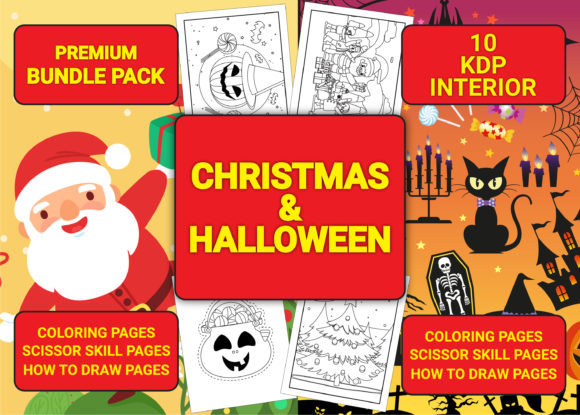
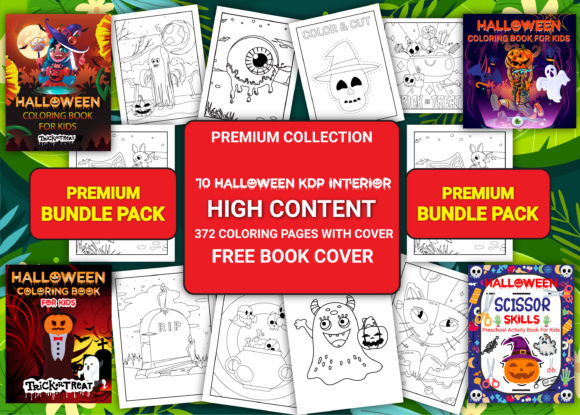
The seasonal rush for low-content and medium-content books on Amazon is a genuine opportunity, but it is also a landscape filled with operational hazards. For creators looking to capitalize on the autumn market, the 10 Halloween Kdp Interior Bundle Pack offers a significant shortcut. However, treating this asset as a simple "upload and forget" solution is the most common error new publishers make. This bundle provides a comprehensive foundation including PDF, AI, PNG, and JPG files in both 8.5″ x 11″ and 8.5″ x 8.5″ sizes, yet success depends entirely on how you manage these assets within Amazon’s strict quality guidelines.
Rather than viewing this pack merely as a collection of pages, experienced publishers understand it as a raw material kit that requires verification, customization, and strategic assembly. Below, we address the critical misunderstandings that often lead to rejected manuscripts or poor sales performance, providing corrective steps to ensure your publishing business remains efficient and profitable.
Understanding Bleed Settings Before Uploading
One of the most frequent reasons for manuscript rejection during the KDP review process involves incorrect bleed configuration. The 10 Halloween Kdp Interior Bundle Pack includes both bleed and no-bleed versions, which is a massive advantage, but only if you select the correct file for your specific project vision.
A common mistake is choosing the "no bleed" PDF for a coloring book where illustrations extend to the edge of the page. If your artwork touches the trim line, you must use the bleed version. Conversely, using a bleed file for an activity book with safe margins can result in content being cropped unexpectedly. Always verify your interior selection against your intended trim size before uploading. Since this bundle provides ready-to-upload PDFs, the technical specifications are pre-set; your responsibility is ensuring your cover design and metadata settings align perfectly with the interior file type you have chosen.
Correcting Misconceptions About Editability
Many users assume that because a product lists "AI files," they can simply open the PDF in Adobe Illustrator and edit vector paths. This is a dangerous assumption that wastes hours of production time. While this bundle includes AI source files, they are primarily intended for extracting elements or modifying layouts at the component level.
The PDF files included are flattened and optimized specifically for print-ready uploading. If you need to combine volumes or remove specific pages, do not attempt to unflatten the PDF. Instead, use the provided high-resolution PNG or JPG assets to reconstruct pages in Canva, PowerPoint, or InDesign. Alternatively, use a dedicated PDF editor to rearrange the pre-made pages. Understanding the distinction between the source files (AI) and the delivery files (PDF/PNG) prevents frustration and ensures your final output maintains the crisp, high-resolution quality required for professional printing.
Strategic Assembly of Coloring Volumes
This bundle contains distinct volumes, such as Halloween Coloring Pages Vol-3 through Vol-9, plus specialized packs like Monster Coloring and Scissor Skills. A prevalent error is uploading these individual 30-page volumes as standalone books without adding value. Amazon’s algorithm and customers alike tend to penalize thin, repetitive content.
Better Approach: Utilize the editable nature of this pack to create unique compilations. Combine Vol-3, Vol-4, and the Monster Coloring pages into a single, robust 90+ page anthology. Use the included AI or PNG files to create custom divider pages or title sheets that unify the disparate volumes. This transforms a generic commodity into a proprietary product. Furthermore, always check the page count against KDP’s minimum requirements for your selected paper type and distribution options to avoid last-minute formatting blocks.
Leveraging the Activity Book and Scissor Skills
The inclusion of 102 pages of Halloween Activity Pages and 30 pages of Scissor Skills distinguishes this bundle from standard coloring packs. However, creators often misclassify these interiors. Scissor skills pages require different paper considerations than standard coloring books due to the physical interaction involved.
When listing scissor skill books, clearly communicate the intended age group and motor skill level in your description. Ensure the binding margin is sufficient so children can actually cut along the lines without fighting the spine. The 8.5″ x 11″ format included in this bundle is ideal for this purpose. Neglecting to highlight the educational aspect of these specific interiors results in missed traffic from parents and educators searching for developmental resources rather than just entertainment.
Cover Creation and Template Utilization
It is vital to note that while this bundle includes interiors with cover placeholders and a free book cover template, you must create your own covers. Relying solely on the placeholder art or failing to adjust the template to your exact page count will result in a rejected upload or a visually broken spine.
The template provided is a starting point, not a finished product. You must calculate your spine width based on the final page count of your compiled interior. A 30-page coloring book has a significantly different spine width than a compiled 120-page activity book. Always generate a fresh cover template using KDP’s calculator after finalizing your interior page count. Additionally, ensure your cover resolution matches the high-resolution standard of the interiors; pixelated covers paired with crisp interiors destroy consumer trust immediately upon delivery.
Verifying Commercial Rights and Platform Restrictions
This bundle comes with a specific license: usage is permitted only for Amazon Kindle Direct Publishing. A critical compliance mistake is assuming these assets can be used for Etsy digital downloads, Shopify stores, or other print-on-demand platforms. Violating this restriction risks account suspension and legal issues.
Before launching, double-check that your entire workflow stays within the Amazon ecosystem. This restriction actually benefits serious KDP publishers by limiting the saturation of these specific designs on external marketplaces. Treat this exclusivity as a feature. Focus your marketing efforts entirely on Amazon Ads and organic KDP optimization rather than diluting your energy across unauthorized channels.
Quality Assurance Checklist Before Listing
Even with print-ready files, human error in file selection occurs frequently. Implement a mandatory pre-upload checklist to protect your account health:
- Dimension Verification: Confirm whether you selected the 8.5x11 or 8.5x8.5 PDF and that your KDP setup matches exactly.
- Bleed Confirmation: Visually inspect the first and last few pages in the previewer to ensure no content is unintentionally cropped or floating outside safety zones.
- Cover Spine Calculation: Recalculate spine width based on the actual number of pages in your uploaded PDF, not the original volume count.
- File Integrity: Ensure you are uploading the PDF version for the interior, not the PNG or JPG, unless you are manually assembling a new document.
- Metadata Alignment: Verify that keywords and categories reflect the specific contents (e.g., "Scissor Skills" vs. "Coloring Book") to avoid misleading customer expectations.
The 10 Halloween Kdp Interior Bundle Pack is a powerful tool for scaling your seasonal catalog, but it demands professional handling. By respecting the technical specifications, understanding the licensing boundaries, and strategically compiling the included volumes, you move beyond simple arbitrage and build a sustainable publishing asset. Success in KDP is rarely about finding a magic file; it is about executing the details correctly when others are rushing to cut corners.